Pro only

Horizun Revit MCP Pro

Available with Horizun Suite, included in the Horizun Hub Pro plan.

The complete edition of the MCP that connects your AI agent to Revit. It includes everything in Community and adds what matters most on a real project: modeling with your template, walls and levels with craft, checking before delivery and laying out sheets to the millimeter.

tools
147
operations
642
Pro only
22
extended
22

Launch price for anyone who subscribes by December 31, 2026, with one hour of 1:1 advice per month. Renewal is charged at the following year's current price, and we notify you before charging it. 7-day guarantee.

Pro 5.0.1 compared with the free Community 4.0.0: 125 tools and 481 operations. See the full comparison · Leer en español
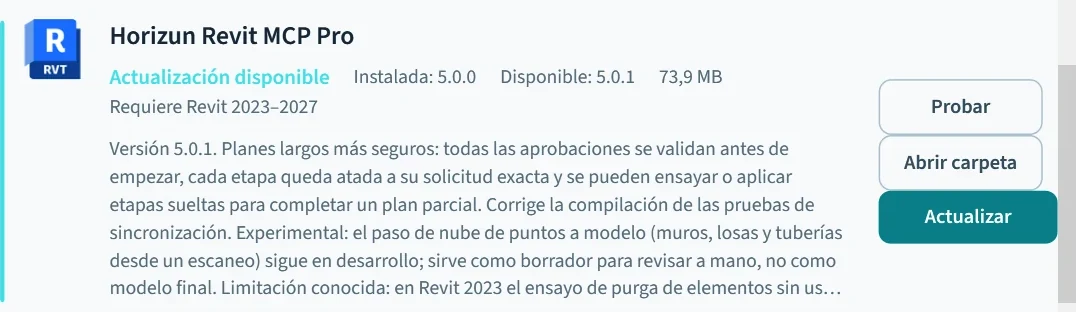
Horizun Revit MCP Pro card in the Horizun Suite 0.5.17 catalog: 5.0.0 installed and 5.0.1 available as an update.
Horizun Suite with Pro 5.0.1 ready to update (captured in November 2026).
WHAT IT GETS DONE

Four jobs Community doesn't do.

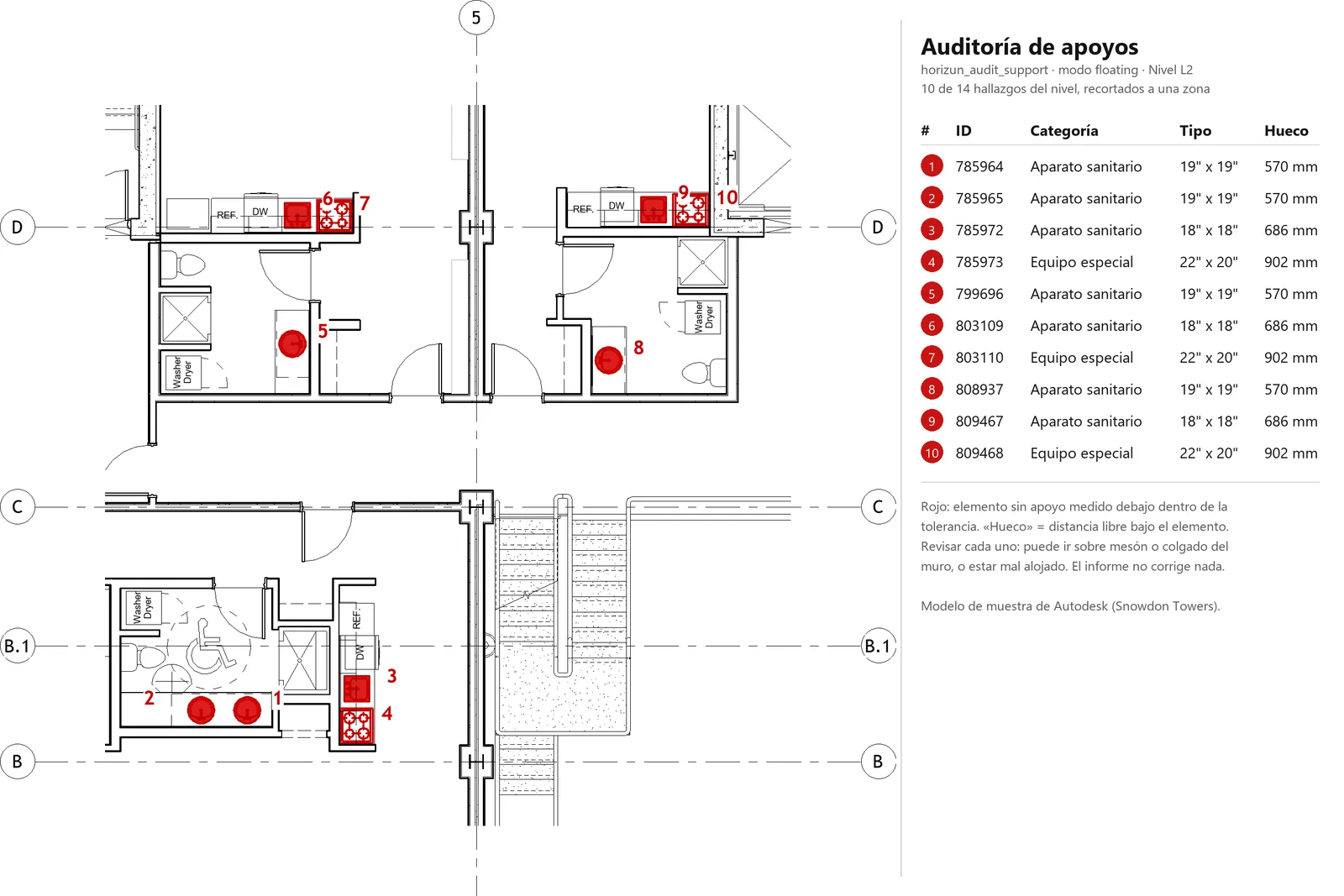
Support audit of level 2 in the Autodesk Snowdon Towers sample model: ten fixtures and equipment with nothing underneath, marked in red and numbered, with their id, category, type and gap in millimetres.

Check before delivery

Finds elements floating without support, loose beam ends, rooms without a floor, unconnected MEP connectors and isolated runs, with each element id so you can fix it.

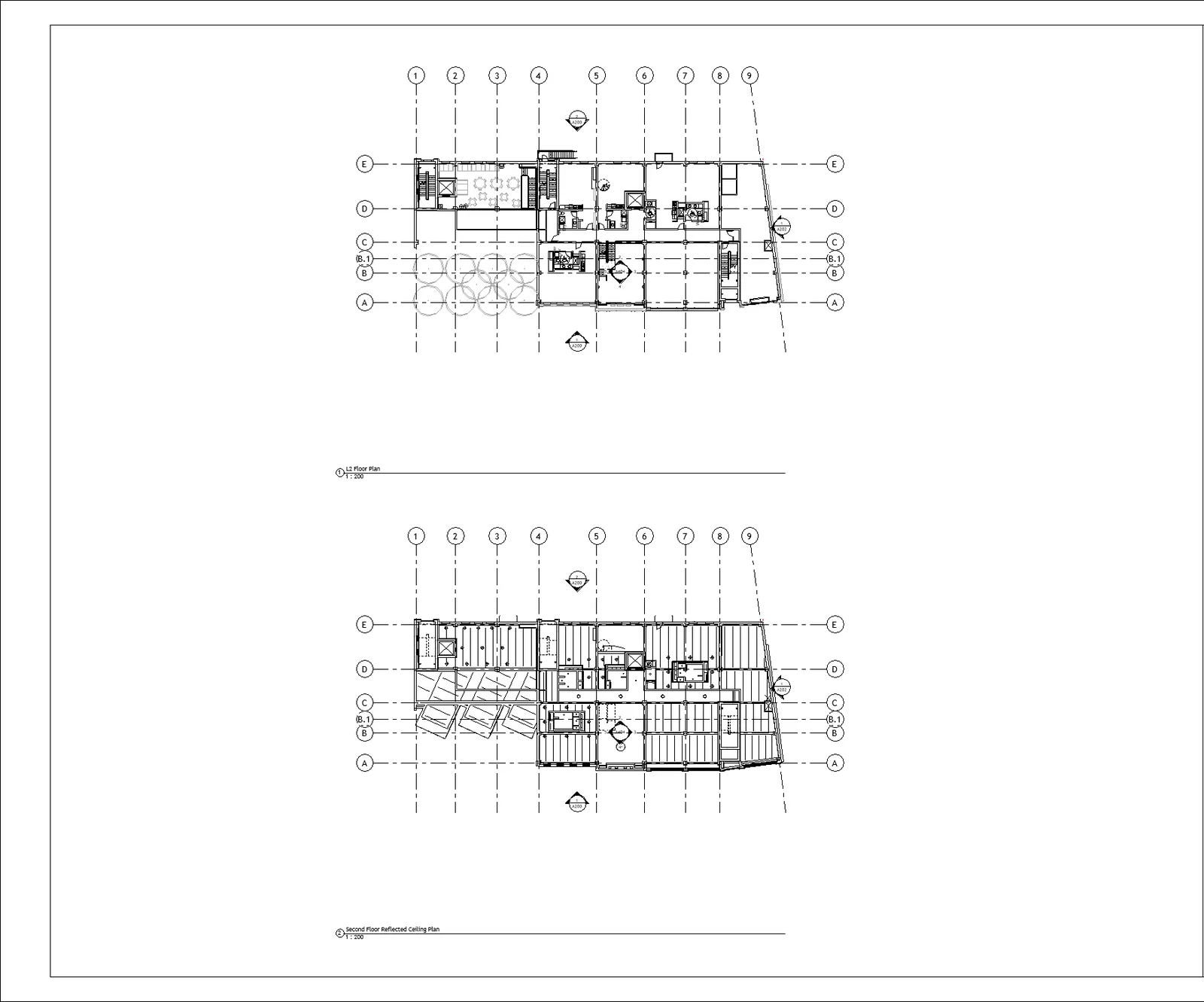
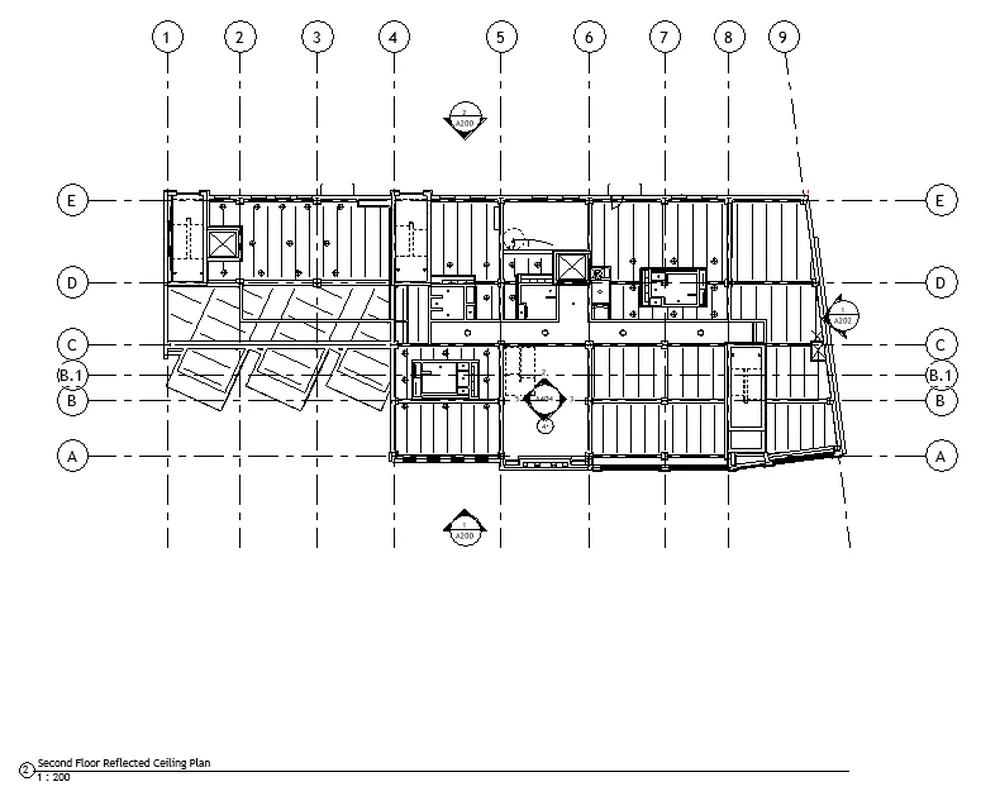
Sheet with the level 2 floor plan and reflected ceiling plan aligned by grid at the same scale, built by the agent in the Autodesk Snowdon Towers sample model.

Lay out sheets to the millimeter

Places and aligns viewports in paper millimeters, sets their scale, crops views to rooms or elements and won't let through viewports that don't fit on the sheet.

Walls and levels with craft

Models architectural walls as finish layers over the linked structural core, without overlaps.

Splits walls, columns and risers at every level they cross, recreates doors and windows and reconnects the networks.

WHAT ONLY PRO HAS

Everything it does, tool by tool.

Every write is rehearsed first and read back from the model after you confirm it: the agent never reports work it did not verify.

01AI-ready templates

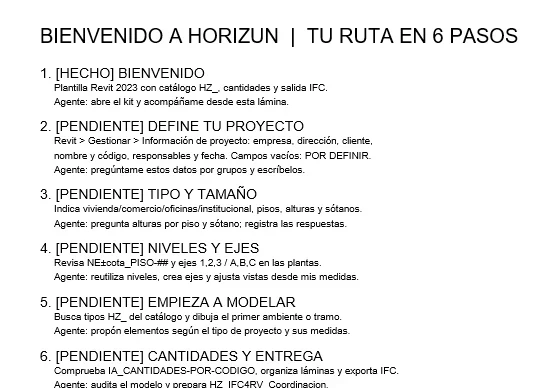
Six-step path on the HZ-000 start sheet of the structural AI-ready template: what the agent reads from the kit.
  • horizun_template_kitReads the kit of a real template: conventions, types, rules, clearances and work steps. The agent picks every type from the catalog and closes with the kit's checks.

02Audit and verification

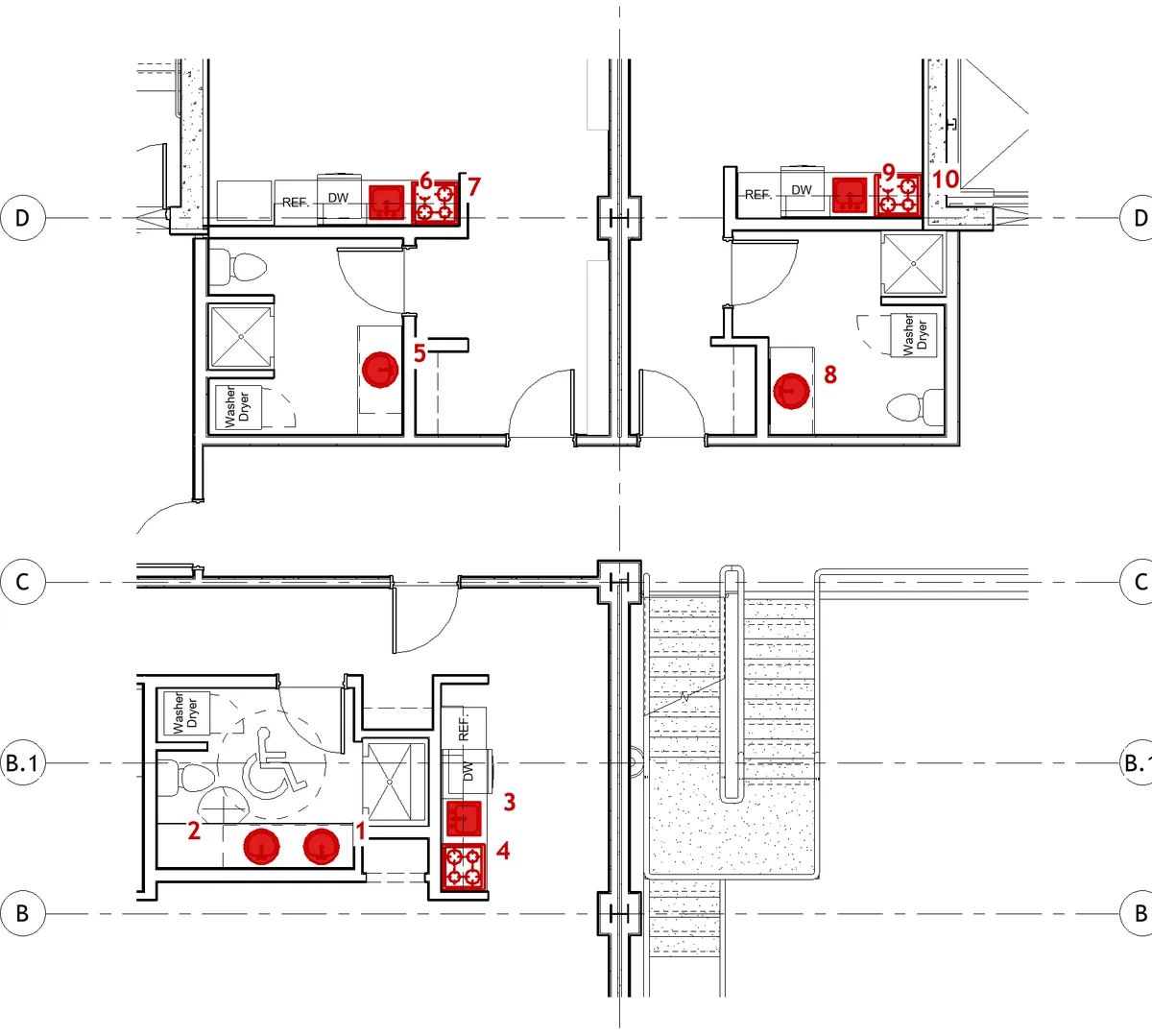
Level 2 plan with the ten unsupported elements the audit marked in red and numbered, in the Autodesk Snowdon Towers sample model.
  • horizun_audit_supportElements floating without support, loose beam ends, rooms without a floor and offsets between models.
  • horizun_audit_mep_connectivityUnconnected MEP connectors, elements without a system and isolated runs.
  • horizun_room_boundariesActual room boundaries, closure gaps and redundant rooms.
  • horizun_selection_contextReads the selection or a set of ids (type, level, parameters, geometry and neighbors), saves a snapshot to compare later and revalidates ids after syncing with central.
  • horizun_query_relationsPer element: what joins it, what cuts it, what it hosts and what is nearby.
  • horizun_measure_geometryVolume, section profiles, boxes, ends and faces, in links too.
  • horizun_query_family_internalsInside families: geometry, parameter census per type and title-block text.
  • horizun_api_helpQueries the installed Revit API and checks signatures before writing code.

03Modeling and craft

  • horizun_split_by_levelSplits walls, columns or vertical MEP runs at every level they cross; recreates doors and windows and reconnects networks.
  • horizun_join_geometryJoins geometry with a declared cut priority, so shared concrete is not counted twice.
  • horizun_wall_finishModels architectural walls as finish layers over the linked structural core, without overlaps.
  • horizun_wall_sweepWall sweeps and reveals, such as baseboards or cornices.
  • horizun_place_joinery_from_cadPlaces doors and windows from the tags in a DWG and reports ambiguous tags, tags without a host wall and duplicates.
  • horizun_mep_fittingsMoves fixtures to the wall face and turns joins into fittings.
  • horizun_plumbing_fixturesConnects plumbing fixtures to their drainage, cold-water and hot-water networks, with the trap you ask for.
  • horizun_family_reloadReloads a family from its RFA and verifies the values you asked to keep.
  • horizun_manage_classification_tableAssigns or reloads the keynote or classification table after checking duplicate keys, missing parents and cycles.

04Sheets and views

Level 2 reflected ceiling plan on the sheet the agent built, with grids and scale, in the Autodesk Snowdon Towers sample model.
  • horizun_sheet_layoutPlaces and aligns viewports on the sheet, in paper millimeters.
  • horizun_view_cropAdjusts a view crop or 3D section box to measurements, elements or rooms.
  • horizun_view_visibilityHides or highlights elements and categories in your own views only; never touches other people's views.
  • horizun_planimetry_opsEdits grid extents, viewports, bubbles, legends and notes, and won't let through viewports that don't fit.

Being fixed, outside the offer and the count

They ship in the product, but we don't sell or count them until they are verified on a real model.

  • horizun_room_finishesBeing fixed: the per-room finish floor fails when applied.
  • horizun_coordination_viewBeing fixed: the color per linked model doesn't show in the view.

There are 22 exclusive tools. The product also ships two experimental point-cloud tools that are not part of the offer. The two being fixed don’t count either. Pro also extends 22 tools it shares with Community. For example, sheet annotation goes from 7 to 19 operations, planimetry queries from 6 to 15 and change verification from 3 to 8.

HOW TO GET IT

Three steps and you're working.

  1. Activate Horizun ProUSD 150 per year. Includes this edition, the full Academy, the PowerBIM Exporter and the AI-ready templates. 7-day guarantee.
  2. Install Horizun SuiteOn 64-bit Windows 10 or 11. From its catalog you install and update Revit MCP Pro; it replaces Community.
  3. Connect your agent"Connect your AI" sets up Claude Code or Codex and guides you with other MCP clients. Works with Revit 2023–2027.

The Revit license and the AI agent you use (for example Claude Desktop) are paid separately. Community stays free and open source (Apache-2.0) on GitHub. Pricing, checkout and the Academy are in Spanish.

Frequently asked questions

What do I need to use Pro?

A Horizun Hub Pro account, Horizun Suite on 64-bit Windows 10 or 11, Revit 2023 to 2027 and an MCP-compatible AI agent.

Does Pro replace Community?

Yes. It includes every Community tool and installs in its place from Horizun Suite.

Does it build models from point clouds?

We don't offer that today. The product also ships two experimental point-cloud tools that are not part of the offer.

Does my model leave my computer?

The MCP runs on your computer next to Revit and doesn't upload the model to Horizun. What the agent reads from the model goes to the AI provider you choose, under its own terms.

Pro only

Take your agent to delivery level.

Horizun Revit MCP Pro comes with Horizun Pro, together with the apps, the Academy and the templates. It installs with Horizun Suite.